UV wall printers (also called wall printing machines or vertical wall printing equipment) have converged in hardware specifications over the past two years — multiple manufacturers use similar mechanical platforms, and differences in nominal resolution and print height are now small in absolute terms. With hardware homogenized, what actually differentiates models is two configuration lines: printhead model options × ink family options. This article focuses on these two dimensions, combined with after-sales terms and contract boundaries, to provide a selection framework that can be executed during the email and sample stages.
For YOWILL-specific printhead models, pricing terms, warranty, and lead time, please refer to the manufacturer’s quote. References to third-party models discuss industry-standard practices only and do not constitute endorsement of any specific model.
Left: YOWILL W2500 Pro wall printing machine product photo (original image composite, unaltered). Right: Wall art sample print result (interior display snapshot).
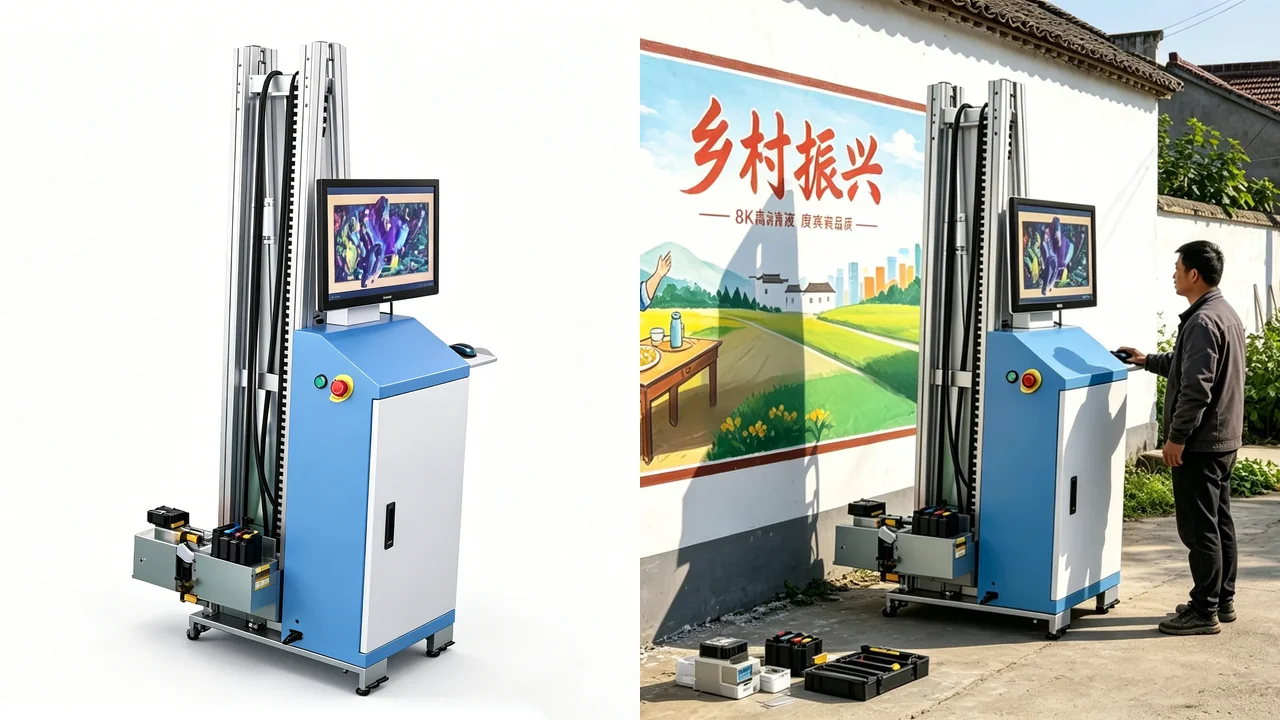
1. How UV wall printing works: know the principle before discussing configuration
The core structure of a UV wall printer consists of three modules:
| Module | Function | Selection focus |
|---|---|---|
| Printhead | Sprays ink onto the wall | Precision, speed, maintenance cost (configured per order) |
| Ink | Forms the image | Family (UV / eco-solvent / dual-ink configuration) |
| Height-tracking system | Tracks wall surface undulation | Ultrasonic (most models) or photoelectric sensor |
UV ink cures through an LED light source attached to the printhead, drying instantly — the image can be touched immediately and adhesion is strong. Eco-solvent ink cures through the solvent itself penetrating into the substrate surface layer, with more controllable color saturation across different substrates. The two place different requirements on machine structure, ink path, and curing system — meaning most models are single-ink-path, and ink family choice = machine choice itself.
YOWILL W2500 Pro is one of the few models supporting dual-ink configuration — eco-solvent ink as default (suitable for outdoor projects or well-ventilated project sites), with UV ink configurable per order (suitable for scenarios requiring faster curing and solvent-free operation). Physically one machine, commercially covering two project types — this is its differentiation point among similar models.
Print height tracking is handled by ultrasonic surface tracking — the machine emits ultrasonic waves, calculates echo time, and dynamically adjusts the distance between printhead and wall. This mechanism adapts to substrates of different flatness — latex paint, tile, exterior wall coatings — and is the key to going live on-site.
2. How to choose ink family — UV vs. eco-solvent vs. dual-ink configuration
By ink family, wall printing equipment typically divides into two categories:
- UV family: Fast curing, image dry to touch, positive contribution to substrate weather resistance
- Eco-solvent family: More stable color saturation, suitable for long-duration outdoor display or large-area outdoor projects
2.1 UV family characteristics
Suitable for indoor projects or scenarios requiring fast curing speed and solvent-free operation. The curing mechanism allows the image to dry instantly, more friendly to immediate-delivery projects.
2.2 Eco-solvent family characteristics
Suitable for outdoor projects or project sites with good ventilation conditions. Color saturation is more controllable across different substrates, suitable for long-duration display.
2.3 Dual-ink configuration models — the minority approach
A few models support both UV ink and eco-solvent ink configuration. YOWILL W2500 Pro is one of them — eco-solvent ink as default, UV ink configurable per order, physically a single ink path but commercially covering two project types. The value of such models lies in: when project types are mixed (both indoor and outdoor, both requiring fast curing and requiring outdoor weather resistance), one machine can cover both.
| Dual-ink | Suitable projects | Representative machine feature |
|---|---|---|
| A. UV family | Indoor murals, hotel lobbies, exhibition backdrops | Single ink path · fast curing |
| B. Eco-solvent family | Outdoor cultural walls, exterior murals, long-duration display | Single ink path · stable color |
| C. Dual-ink configuration model | Mixed project types, taking on both side projects | W2500 Pro eco-solvent default · UV ink configurable per order |
Decision principle: First look at project scenario distribution, then reverse-derive the model — single project type picks single-ink-path models, mixed project types pick dual-ink configuration models. One machine printing two ink types at the same time is either a physically meaningful dual-ink-path (high cost, heavy machine), or a per-order option (most dual-ink configuration models take this path).
3. How to choose printhead model — the triangle of precision, speed, and maintenance cost
Printhead selection is not “the more expensive the better” but a combination of three variables:
- Precision: Affects image detail, color gradient, and text clarity
- Speed: Affects capacity and delivery rhythm
- Maintenance cost: Affects printhead lifespan, cleaning frequency, and spare parts order cycle
3.1 Three common printhead model ranges
| Printhead range | Precision | Speed | Maintenance cost | Suitable projects |
|---|---|---|---|---|
| Epson series (DX7 / TX800 / I1600, etc.) | High | Medium | Low | Small to medium batch, precision priority |
| Ricoh series (G5 / G6, etc.) | Medium | High | Medium | Capacity-oriented projects |
| Kyocera series | Medium-high | High | Medium | Large-format high-frequency printing |
Specific printhead model is configured per order — no single printhead model fits all projects. W2500 Pro supports multiple printhead model options (including Epson DX7, I1600, I3200, Ricoh G6, etc.), combinable per project requirements. Specific model and combination are confirmed per order quote.
3.2 Three-point inquiry checklist for printhead options
When approaching the manufacturer, at minimum ask three things:
- Printhead model and quantity — Get the specific model, not just “how many printheads”
- New / pulled / refurbished printhead — All three can run, but lifespan and stability differ — must be documented in writing
- Warranty responsibility — Manufacturer covers or printhead original manufacturers covers, written into the contract
Printhead warranty boundary clauses can refer to the extended logic in How to choose a UV printer printhead — warranty is not just “replace if broken”, it’s about clarifying how many parties you face in the repair process.
4. Print height and applicable scope — 2.5 m, horizontal extension, traversal above wall flatness
The applicable scope of applicable scope of UV wall printers is determined by three variables:
| Variable | Common specification | Selection meaning |
|---|---|---|
| Single-pass print height | ≤2.5 m | Most models have this ceiling; beyond requires segmented stitching |
| Horizontal width | Extended per machine | Actual horizontal coverage range per machine specification |
| Print speed | Per printhead configuration | Different printhead models have varying speed capabilities |
4.1 How to handle high walls
When single-pass print height exceeds 2.5 m, the mainstream approach is segmented stitching — split the image into two to three segments to print, with feature-point alignment between segments (marker points or image alignment points). This approach places requirements on the image design stage: high-wall images need to reserve stitching alignment positions, rather than printing one entire image forcefully.
4.2 Surface preparation for wall flatness
UV wall printing has clear requirements on wall flatness:
- Latex paint walls: Good adhesion, the most easily adapted substrate.
- Tile / mosaic: Joint seams and surface protrusions require the ultrasonic height-tracking system to continuously dynamically adjust.
- Exterior wall coatings: Water absorption rate and adhesion vary greatly — must verify by small-area sample printing.
Do not skip the sample printing step — the adhesion difference between different batches of the same coating can reach tens of percent. Testing adhesion + color fastness + actual cycle time on the same wall surface in the same area is closer to real performance than any spec sheet.
5. After-sales and spare parts terms to settle
The after-sales terms of a UV wall printer can affect the actual use cycle of the entire machine. In overseas scenarios, at minimum five items need to be settled:
| # | Item | Specific degree to clarify |
|---|---|---|
| 1 | Printhead warranty | Manufacturer covers or printhead original manufacturers covers, written into contract |
| 2 | Spare parts list | Common consumables list numbers + inventory description |
| 3 | Training method | Remote / video / on-site, how many operators covered |
| 4 | Fault response | Response method + time limit, written into contract |
| 5 | Spare parts air freight | Whether overseas projects can support urgent air freight, order cycle |
The fourth item is most easily overlooked. Most cross-border disputes are not about the machine itself, but about the gap between “agreed verbally” and “not written into the contract”.
YOWILL is a Shenzhen UV source manufacturer. The technical team has over ten years of digital printing industry experience, providing remote installation guidance, operation training, and spare parts supply. In overseas project scenarios, printhead warranty responsibility, overseas response method, and spare parts order cycle are executed per contract terms, confirmed separately during order negotiation.
6. Putting configuration selection into a comparison table
Printhead model, ink family, and wall dimensions are scattered across the manufacturer’s spec sheet, emails, contract drafts, and sample reports — without consolidating into a table, decisions rely on impression, which is dominated by the first-contact experience.
| Dimension | Candidate A (UV family) | Candidate B (Eco-solvent family) | Candidate C (Dual-ink configuration - W2500 Pro) |
|---|---|---|---|
| Ink family | Single ink path · UV | Single ink path · Eco-solvent | Eco-solvent default · UV ink configurable per order |
| Suitable projects | Indoor murals / hotel lobbies | Outdoor cultural walls / exterior murals | Mixed project types · covering both sides |
| Printhead model | Multiple models supported | Multiple models supported | Multiple models supported |
| Single-pass print height | Per machine spec | Per machine spec | ≤2.5 m · ultrasonic surface tracking |
| After-sales terms | Per contract execution | Per contract execution | Printhead warranty · remote training · overseas response |
| Overall match | Indoor projects: ★★★★ Outdoor projects: ★★ | Outdoor projects: ★★★★ Indoor projects: ★★ | Mixed projects: ★★★★★ Single project: ★★★ |
Decision rules:
- Single project type (indoor only or outdoor only) → Pick A or B, single-ink-path models are more focused
- Mixed project types (indoor + outdoor both) → Pick W2500 Pro, one machine covers two scenarios
- Budget-sensitive → Start with standard printhead configuration, upgrade as needed
- After-sales-sensitive → After-sales terms written in the contract, not verbal promises
The last row should not only fill in the machine price. Include alliance, tariffs, sample fees, spare parts force, and printhead spare parts service — printhead configuration + ink configuration + after-sales terms considered jointly; looking at machine price alone has limited significance.
Frequently Asked Questions
What scenarios is a UV wall printer suitable for? Wall surfaces, exterior walls, cultural walls, and art installations, including hotel lobbies, exhibition backdrops, and commercial space murals. Wall flatness, water absorption, and coatings all affect the actual result — skipping the sample print stage is not recommended.
Can one UV wall printer use both UV ink and eco-solvent ink? Most models are single-ink-path and locked to one ink family. A few support dual-ink configuration — for example, W2500 ships with eco-solvent ink as default, and UV ink can be ordered as a configuration option to cover more project types. Specific configuration is confirmed per order.
What printhead requirements does wall printing have? Three common printhead model ranges — Epson series (high precision, moderate speed, friendly maintenance), Ricoh series (industrial-grade stability, long lifespan), and Kyocera series (high-frequency printing, capacity-oriented). Specific model is configured per order; no single model fits all projects.
What is the maximum print size for wall printing? Constrained by the machine structure, most models have a single-pass print height ceiling of around 2.5 m. Beyond that, segmented stitching or a larger machine is required. The actual horizontal extension range depends on the machine specification.
What after-sales terms does a UV wall printer need? At minimum: printhead warranty responsibility, common consumables list and spare parts supply, remote or video training options, and fault response time limits. For overseas channel scenarios, also confirm printhead service process and whether spare parts air freight is supported.
What surface preparation is needed before wall printing? Depends on substrate. Latex paint walls, tiles, mosaics, and exterior wall coatings vary significantly in adhesion. It is strongly recommended to test adhesion and color fastness on a small area of the same wall surface first, before launching a full print.
UV wall printer hardware has converged — what actually differentiates models is printhead model × dual-ink configuration. First break down project scenarios (indoor / outdoor / mixed), then reverse-derive machine configuration: single scenario pick single-ink-path models, mixed scenario pick dual-ink configuration models. Printhead model is selected per the precision/speed/maintenance cost combination, configured as needed.
YOWILL W2500 Pro wall printing machine (≤2.5 m single-pass print height, horizontal extension per width, ultrasonic surface tracking, multiple printhead model options, dual-ink configuration covering both UV ink and eco-solvent ink), applicable to indoor and outdoor murals, cultural walls, and commercial space art. YOWILL is a Shenzhen UV printer source manufacturer, with a technical team having over ten years of digital printing industry experience, providing remote installation guidance, operation training, and spare parts supply. Contact sales for configuration and sample recommendations tailored to your wall substrate and target market.
Frequently Asked Questions
What scenarios is a UV wall printer suitable for?
Wall surfaces, exterior walls, cultural walls, and art installations, including hotel lobbies, exhibition backdrops, and commercial space murals. Wall flatness, water absorption, and coatings all affect the actual result — skipping the sample print stage is not recommended.
Can one UV wall printer use both UV ink and eco-solvent ink?
Most models are single-ink-path and locked to one ink family. A few support dual-ink configuration — for example, W2500 ships with eco-solvent ink as default, and UV ink can be ordered as a configuration option to cover more project types. Specific configuration is confirmed per order.
What printhead requirements does wall printing have?
Three common printhead model ranges — Epson series (high precision, moderate speed, friendly maintenance), Ricoh series (industrial-grade stability, long lifespan), and Kyocera series (high-frequency printing, capacity-oriented). Specific model is configured per order; no single model fits all projects.
What is the maximum print size for wall printing?
Constrained by the machine structure, most models have a single-pass print height ceiling of around 2.5 m. Beyond that, segmented stitching or a larger machine is required. The actual horizontal extension range depends on the machine specification.
What after-sales terms does a UV wall printer need?
At minimum: printhead warranty responsibility, common consumables list and spare parts supply, remote or video training options, and fault response time limits. For overseas channel scenarios, also confirm printhead service process and whether spare parts air freight is supported.
What surface preparation is needed before wall printing?
Depends on substrate. Latex paint walls, tiles, mosaics, and exterior wall coatings vary significantly in adhesion. It is strongly recommended to test adhesion and color fastness on a small area of the same wall surface first, before launching a full print.
Share this article